

Short Video
The Short Video feature in NoteX allows you to automatically turn any note, text, quiz, or transcript into engaging short videos with AI-generated voiceovers.
This helps you study more effectively through visual and audio content, boost engagement, and easily share on social media.
Key Benefits:
-
Learn anytime, anywhere through visual and audio content.
-
Videos can include quizzes for better recall and engagement.
-
Easily share videos on social platforms, study groups, or with friends.
1. UI/UX Specification
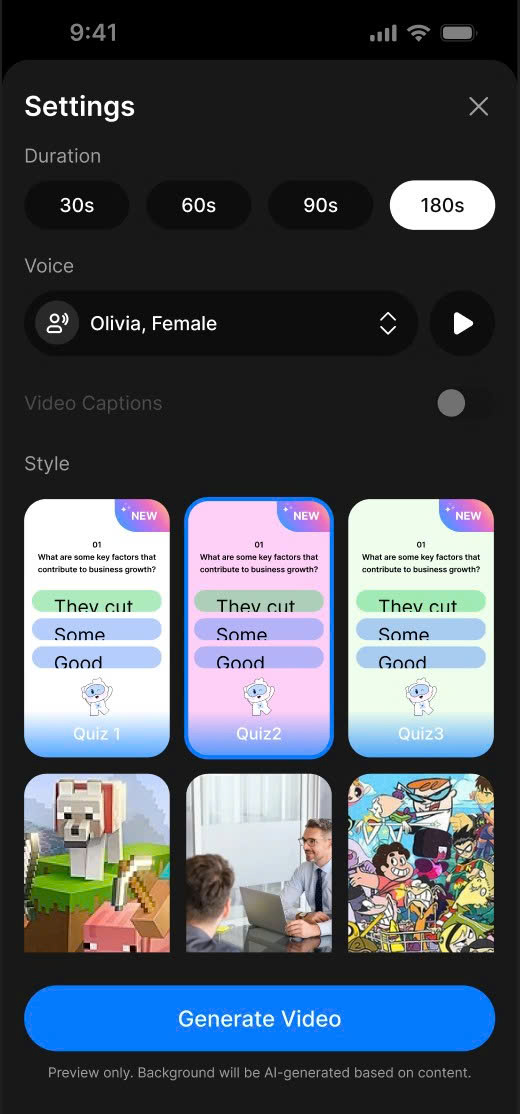
Create Short Screen
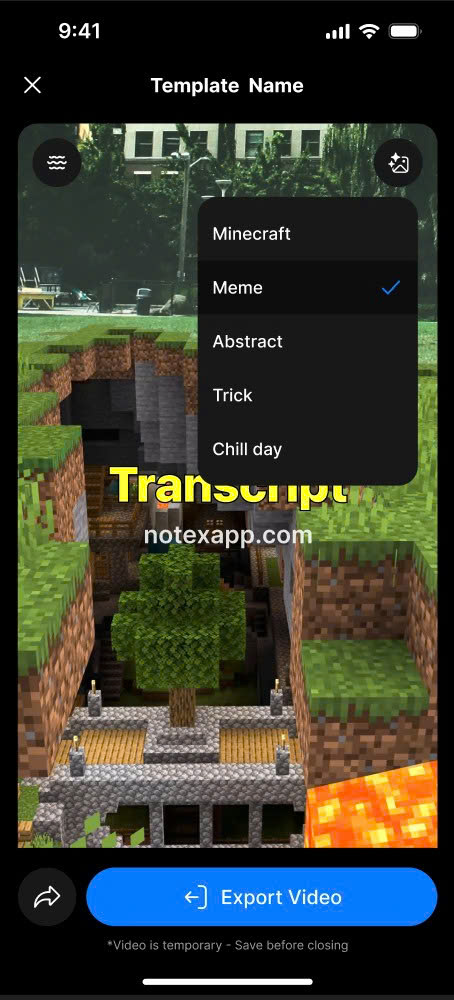
Short Detail Screen
2. How to Use
-
Open the note, go to the "Shorts" tab in the Note Detail screen.
-
A Bottom Sheet will appear with video setup options.
-
Select video duration:
- Available options: 30s, 60s, 90s, or 180s.
-
Choose a voice:
-
Options include Olivia, Female, and other voice types.
-
You can listen to a preview before generating the video.
-
-
Enable or disable captions:
- Toggle the 'Video Captions' switch to include subtitles.
-
Select style/theme:
- Choose from templates such as Quiz, animation, real images, Minecraft, and more.
-
Click 'Generate Video' to start processing.
-
Wait for the AI to process your content, then preview, download, or share the video.
3. Notes & Tips
-
You can adjust voice, style, duration, and captions as many times as you like before publishing.
-
For Quiz Shorts, the video background is automatically generated by AI to match your content, making it more dynamic and relevant.
-
Subtitles are useful when sharing on silent playback platforms like TikTok or Instagram.
-
Preview the video before downloading to ensure it meets your expectations.
-
Short Video is ideal for revision, microlearning, and social learning formats.
4. FAQ
What video durations can I choose from?
You can select from 30s, 60s, 90s, or 180s.
Can I choose different voices or listen before generating the video?
Yes. You can choose from multiple voices and preview them before generating.
Can I add captions to the video?
Yes. Just enable the 'Video Captions' option, and the video will include subtitles automatically.
Can I download or share the generated video?
Absolutely. Once the video is ready, you can preview, download, or share it across platforms.
Q: Will AI generate a background for Quiz Shorts automatically?
A: Yes. For Quiz Shorts, the background is automatically created by AI based on your content.